> ## Documentation Index
> Fetch the complete documentation index at: https://docs.ttarena.app/llms.txt
> Use this file to discover all available pages before exploring further.
# Draws, referees, and live scoring
> Generate group-stage and knockout draws, set up your referee system, and keep scores live during the tournament.
Once a category has enough approved players, you're ready to turn registrations into a draw.
## Generating a draw
Open the Draws tab for a category and choose a format, group stage, straight knockout, or group stage followed by a knockout. Set the **Number of groups** if you're using a group stage, and TT Arena lays out the bracket for you.
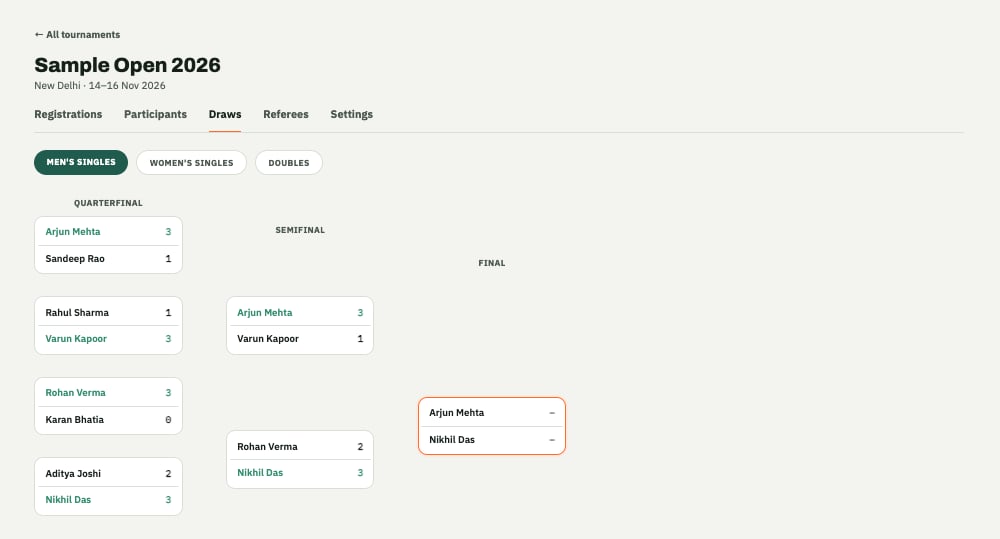 You can come back and **Edit format** later if you need to adjust the number of groups or switch formats before the draw locks in.
Results flow all the way through automatically: group standings feed the knockout bracket, and the knockout bracket carries through to the podium and third-place finish.
## Setting up referees
TT Arena's referee system lets the people scoring matches on the day do it from their own device, rather than you manually entering every result.
From the Referees tab:
* Add a referee by their name and phone number.
* **Assign groups** to hand a referee responsibility for specific groups or tables.
* **Revoke** access if someone's no longer helping out, or **Reactivate** them if they're back.
## Live scoring
As referees score matches, results update immediately, group standings, the knockout bracket, and each player's own Schedule tab in the Player app all reflect it right away. Players don't need to refresh anything to see a live match or a result land.
See what your players see once their draw and schedule are live.
This documentation is built and hosted on [Mintlify](https://mintlify.com), a developer documentation platform.
You can come back and **Edit format** later if you need to adjust the number of groups or switch formats before the draw locks in.
Results flow all the way through automatically: group standings feed the knockout bracket, and the knockout bracket carries through to the podium and third-place finish.
## Setting up referees
TT Arena's referee system lets the people scoring matches on the day do it from their own device, rather than you manually entering every result.
From the Referees tab:
* Add a referee by their name and phone number.
* **Assign groups** to hand a referee responsibility for specific groups or tables.
* **Revoke** access if someone's no longer helping out, or **Reactivate** them if they're back.
## Live scoring
As referees score matches, results update immediately, group standings, the knockout bracket, and each player's own Schedule tab in the Player app all reflect it right away. Players don't need to refresh anything to see a live match or a result land.
See what your players see once their draw and schedule are live.
This documentation is built and hosted on [Mintlify](https://mintlify.com), a developer documentation platform.