> ## Documentation Index
> Fetch the complete documentation index at: https://docs.ttarena.app/llms.txt
> Use this file to discover all available pages before exploring further.
# Managing registrations
> Review, approve, and edit player registrations, or add a player to your tournament manually.
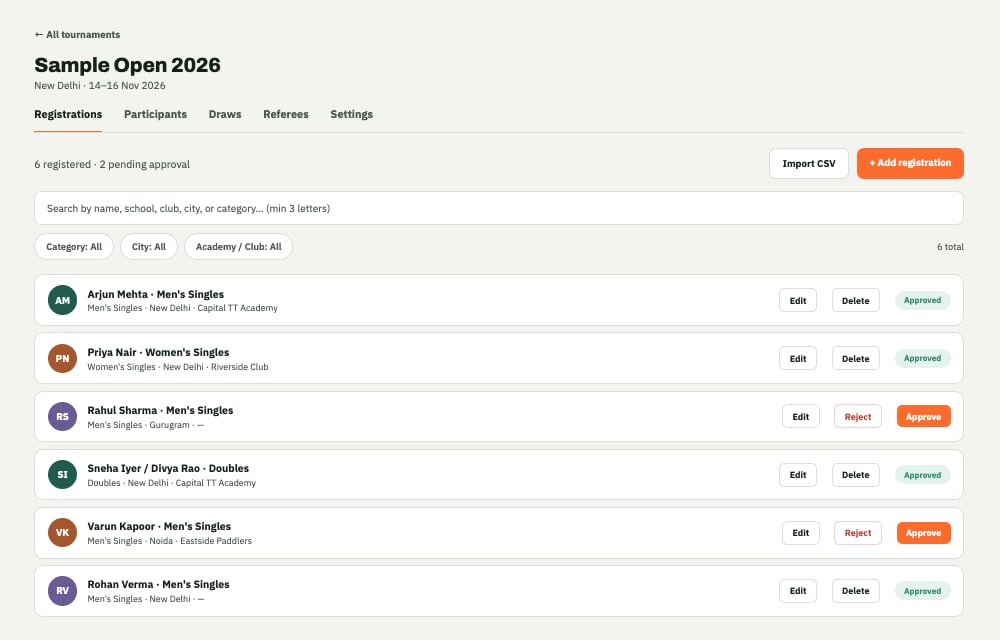
The Registrations tab is where every player who has registered, or been added, shows up.
 ## Reviewing a registration
Each entry shows the player's full name, date of birth, gender, city, district, academy or club, and the category they've entered. Open any entry to see the complete details before deciding.
## Approving a registration
Select **Approve** on an entry once you've checked it over. Approved players move into the draw once you generate it for their category.
## Editing a registration
If a player made a mistake, or you need to correct something on their behalf, select **Edit** on their entry and update the details directly.
## Adding a player manually
Not every player registers themselves ahead of time. Select **Add registration** to enter a player's details yourself, useful for walk-ins or last-minute entries on the day.
## Finding approved players
Once you've approved a batch of registrations, the **Participants** tab next to Registrations gives you a clean roster of just the approved players, without the pending and rejected entries mixed in. Use the same search and filters here to find someone quickly.
Turn your approved players into a draw, and get scores flowing live on the day.
This documentation is built and hosted on [Mintlify](https://mintlify.com), a developer documentation platform.
## Reviewing a registration
Each entry shows the player's full name, date of birth, gender, city, district, academy or club, and the category they've entered. Open any entry to see the complete details before deciding.
## Approving a registration
Select **Approve** on an entry once you've checked it over. Approved players move into the draw once you generate it for their category.
## Editing a registration
If a player made a mistake, or you need to correct something on their behalf, select **Edit** on their entry and update the details directly.
## Adding a player manually
Not every player registers themselves ahead of time. Select **Add registration** to enter a player's details yourself, useful for walk-ins or last-minute entries on the day.
## Finding approved players
Once you've approved a batch of registrations, the **Participants** tab next to Registrations gives you a clean roster of just the approved players, without the pending and rejected entries mixed in. Use the same search and filters here to find someone quickly.
Turn your approved players into a draw, and get scores flowing live on the day.
This documentation is built and hosted on [Mintlify](https://mintlify.com), a developer documentation platform.